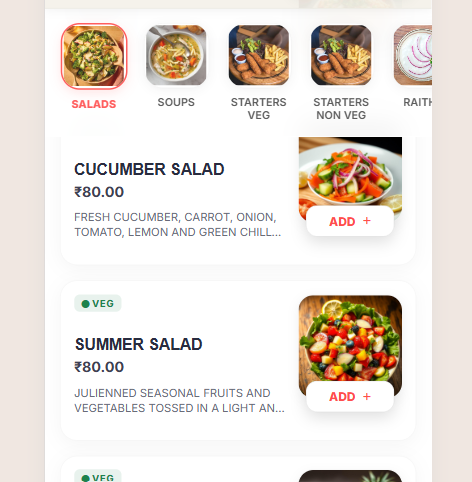
We are thrilled to bring you the latest enhancement to your SmartMenu experience – the Ziggy Theme! Designed with an Elegant Classic List Style, this theme will give your restaurant's digital menu a premium, sophisticated feel.
What's New in Ziggy?
- Elegant Typography & Layout: Featuring the beautiful 'Outfit' and 'Inter' fonts for perfect readability and modern aesthetics.
- Variant Pricing Display: Items with multiple variants now cleanly display dynamic price ranges (e.g., from ₹80 - ₹150), ensuring transparency for your customers.
- Seamless Selection Modal: A beautifully customized dark-mode pop-up for selecting variations and addons smoothly.
- Integrated Footer details: Now automatically showing your business' "Locate Us" address directly in the menu footer.
How to Enable the Ziggy Theme
- Login to your SmartMenu admin dashboard.
- Navigate to Menu Edit -> View Style.
- Select the Ziggy theme from the list of available designs.
- Click Save to instantly update your public menu!
🌟 Enhancing Your Menu with Category Images
The Ziggy theme is designed to be highly visual. Adding category images makes navigation easier and more appetizing for your guests. Here is how to add them:
- Step 1: Log in to your SmartMenu admin panel and go to Menu Builder → Categories.
- Step 2: Click the Edit button next to any category you wish to update.
- Step 3: In the category editor, find the Category Image upload section.
- Step 4: Upload a high-quality, vibrant photo (a landscape 16:9 image works best!).
- Step 5: Click Save. The Ziggy theme will immediately start displaying this image as a beautiful header for the category!
Pro Tip: Consistent image styles (like similar lighting or angles) will make your digital menu look incredibly professional!
Elevate your customer's ordering experience today with Ziggy.